Platform
Accounting & Close PaymentsNew AP & Bill Pay AR & Invoicing CRM & Deal-to-Cash FP&A & Planning HR & People Ask Kate, AI
More
Pricing Savings calculator Blog Trust & security Sign in
Home/Platform/AP & bill pay
Accounts payable, procurement & bill pay

Bills arrive, get read, matched, approved, and paid.

Forward a bill to your company’s inbound address and the payable drafts itself. It matches against the purchase order and the goods receipt, holds itself back if a price or a quantity falls outside tolerance, and releases in a payment run that posts its own entry. What’s left for you is the judgment.

What’s inside

The whole payable, from the request to the tie-out.

Requisition, purchase order, receipt, bill, match, approval, run, settlement. Every step is a record on the same ledger, so nothing gets re-keyed and there is no sync between apps to reconcile.

Requisition Purchase order Goods receipt Bill 3-way match Approval Payment run Settled & tied out

Bill intake

Your company gets a working inbound email address from day one, so forwarding a bill is the entire workflow. Drop a PDF, let a vendor upload through their portal, or text a photo of a receipt. OCR and AI read the document and propose a complete draft: vendor, dates, line items, totals. Anything the classifier isn’t sure about lands in a triage queue instead of being filed into the wrong place.

  • Email-in, portal upload, drag-and-drop, and text-a-receipt
  • Recurring bills on a schedule, with the vendor’s own bill number captured alongside yours
  • Foreign-currency bills carry an explicit FX rate and a reporting-currency figure on every line
  • Every bill keeps a permanent link to the document it came from

Match, at real depth

A bill with a purchase order and a goods receipt gets a full three-way match. A services PO with nothing to receive degrades cleanly to two-way rather than stranding on a receipt that will never exist. A bill with no PO at all is still a bill and posts like any other, until you switch on the control that requires one, which refuses the approval outright and flags any no-PO bill already on the books. Every variance is classified by root cause and routed to the function that can fix it: price to the buyer, quantity to receiving.

  • Passed, warning or failed per line, with purchase price variance calculated
  • Price and quantity tolerances per company, with a per-line override
  • Preventive mode holds a failed bill before it books, with an explicit approver override
  • Goods-received-not-invoiced clearing consumed line by line as the bills arrive

Purchasing and commitments

Requisitions are created, submitted, approved or canceled, and the procurement assistant can propose a whole requisition from one sentence of plain text. A supplier’s quote becomes a purchase order by extraction. An approved PO encumbers the money, approving the bill liquidates it, so committed spend stops being counted twice the moment it turns into actual spend.

  • Contracts raise their own commitments and scheduled bills, and renewal notices come from the real contract terms rather than a calendar reminder
  • POs through draft, approve, dispatch, acknowledge, with goods receipts against the lines
  • Funds check against the live budget version, set to warn or to block
  • Department burn: budget, committed and actual side by side, with a notification when a bill approval crosses the line
  • Catalog with preferred suppliers and a buying steer, plus AI spend classification
  • Procurement KPIs: open commitment, purchase price variance, first-time match rate, average PO cycle days, maverick spend

Approvals with real SoD

Requisition and contract approvals route by amount, type and dimension, and that routing is a validated function, never a model’s opinion. Where the money actually moves, maker cannot be checker: the person who built a payment run cannot approve it, and the person who submitted a vendor’s bank details can never approve them. Releasing a run takes its own approve-level capability, which an admin’s Manage badge does not carry, so someone can configure the whole system and still be unable to move a dollar.

  • Approve and release are different permissions, held by different people
  • M-of-N quorum on any run above a configurable amount
  • Self-approved journal entries, and no-PO bills where you require a PO, are raised as exceptions
  • Every approval, override and release is in the audit trail

Payment runs

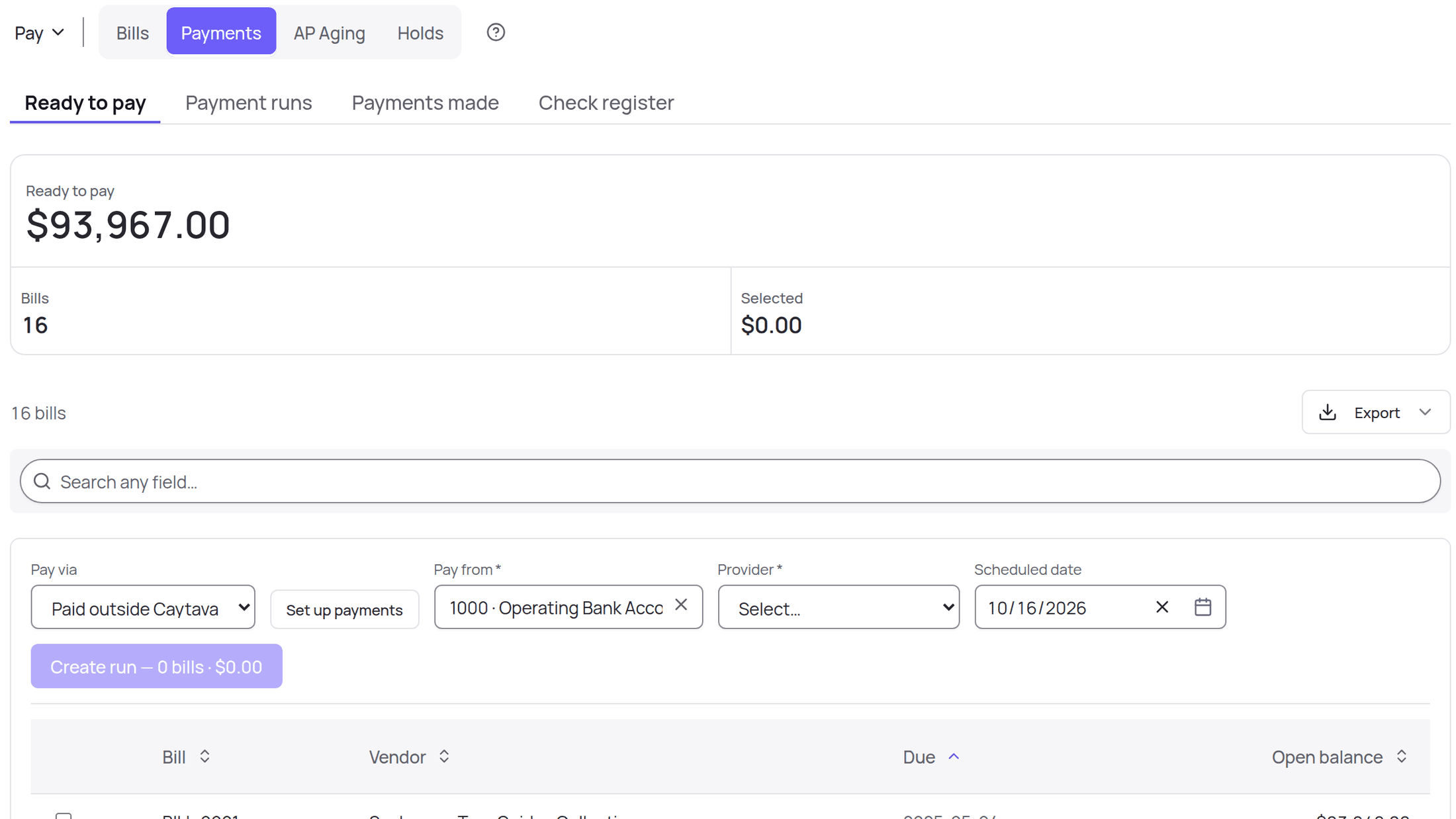
Pick the bills that are ready, submit the run, approve it, release it. When embedded payments are switched on, releasing originates the disbursements and the settlement webhook posts the ledger entry through the same validated function a manual payment uses. A return reverses it and fails that item, so the bill goes back on the list instead of quietly disappearing.

  • Partial payments, per-item settle and fail, cancel while nothing has left
  • A funding view before you release, checked per entity on a multi-entity run
  • Vendors are told when their payment is scheduled, not just when it moves
  • The rails and what they cost live on Payments

Credits and corrections

Vendor credits and buyer-issued debit notes are first-class postings on the same approval and allocation spine, each with its own numbering. Voiding a posted bill reverses everything it did, including the inventory receipt it booked. A bill that was miscoded and is already paid can be recoded, and its project or department tags changed, without anyone writing a reversing entry by hand.

  • Vendor credits and debit notes, on VC and DN sequences
  • Void, duplicate, PDF and the source document on every bill
  • Recode the account or the dimension tags on a finalized document

What you owe, on one screen

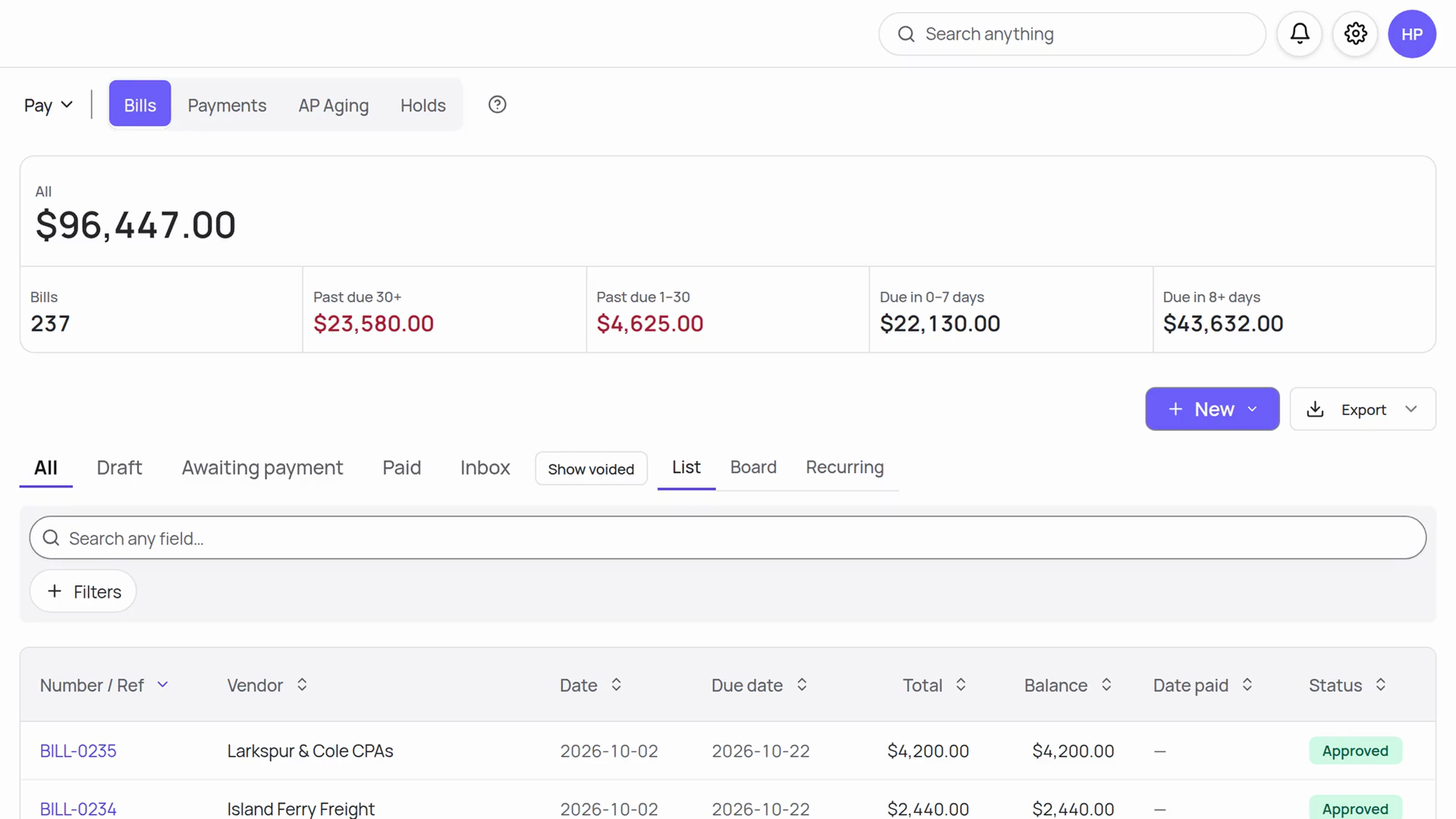
The command center partitions every open payable by urgency: over 30 days past due, 1 to 30 days past due, due inside a week, due later, and the total. Bills already sitting in an open run show as in flight, so you can see what is moving without counting it twice. Click a bucket and land on that filter.

  • AP aging three ways: the company total, by vendor and bucket, and every open bill in one sortable list
  • Click any aging figure to see the open bills behind it, then open the bill itself
  • Five of the exception engine’s 44 rules watch payables continuously: bill without a PO, three-way-match variance, received not billed, duplicate vendors, and missing receipt
The vendor portal

Your vendors keep their own paperwork current.

AP’s hidden cost is the chasing. Invite a vendor by email and they maintain their own record: bank details, tax forms, invoices, and the status of every payment. You stop being the middleman.

  • Bank details you never handle. The vendor enters them. Account and routing numbers are encrypted at rest and only the last four ever display. A change is a new profile that supersedes the old one, never an edit in place, which is the first defense against the email that says “we’ve changed banks.”
  • A gate nobody can switch off. Every payment profile lands pending, and the person who submitted it can never approve it. That check lives in the code that stores the details rather than in a policy someone configures, so a missing policy cannot disable it.
  • Tax forms collect themselves. W-9, W-8BEN and W-8BEN-E are submitted and vaulted through the portal, validated against the IRS certification and e-sign attestations, and stamped with the version the vendor actually signed. 1099 figures come from your real payment history and export when you need them.
  • Fewer “where’s my payment?” emails. Vendors see their own bills and payment statuses, and can upload or email a new invoice straight into your intake queue.
Ask Kate

“What do I owe this week?” Answered from the aging.

Kate reads your payables through real database queries, never arithmetic over retrieved text, and drafts the records a human then approves: a bill, a vendor credit, a purchase order, a new vendor. Money itself never moves on her word. Releasing a run is a human action behind its own capability.

“What do I owe?”“Draft a bill for Summit Supply, $12,400” “Which 1099 vendors are missing a W-9?”“What’s our average bill?” “Build me AP aging by vendor”“Draft a vendor credit for the short shipment”
What it replaces

One line item instead of four.

The bill-pay subscription, the purchasing tool, the vendor-onboarding portal and the 1099 tracker are one module here, sitting on the ledger the bills post to. The accrual, the payment and the settlement are the same system, so there is nothing to reconcile between AP and the GL.

No per-seat fee

Approvers, requesters and reviewers cost nothing to add. Charging per user is exactly how the bill-pay tools grow their invoice, and it is the reason people stop giving colleagues access.

Depth arrives on Growth

Purchase orders, three-way match, vendor compliance and payment separation of duties come with the $399 plan. Bill pay itself is in every plan, and plans start at $59.

Movement priced per use

Moving money costs what it costs to move, with nothing buried in a spread. The rails are on Payments and the per-payment numbers are on the pricing page.

Keep exploring

Connected on both sides.

See it live

Bring a stack of bills. Leave with a payment run.

Thirty minutes: forward us a few bills, watch them draft, match, route and land in a run, on documents that look like yours.

Let’s begin